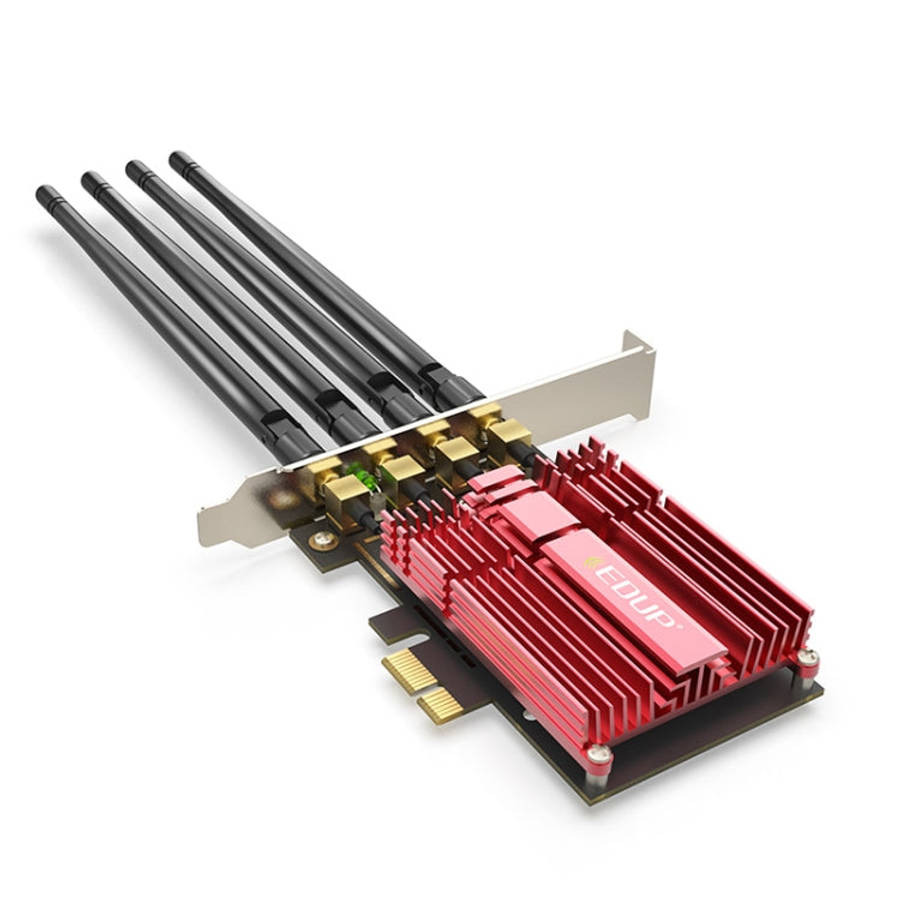
EDUP 9633-800 AC1900Mbps 2.4GHz & 5GHz Dual Band PCI-Express Adapter 4 Antenna External Network C... EDUP 9633-800 AC1900Mbps 2.4GHz & 5GHz Dual Band PCI-Express Adapter 4 Antenna External Network C... EDUP 9633-800 AC1900Mbps 2.4GHz & 5GHz Dual Band PCI-Express Adapter 4 Antenna External Network C... EDUP 9633-800 AC1900Mbps 2.4GHz & 5GHz Dual Band PCI-Express Adapter 4 Antenna External Network C... EDUP 9633-800 AC1900Mbps 2.4GHz & 5GHz Dual Band PCI-Express Adapter 4 Antenna External Network C...

EDUP 9633-800 AC1900Mbps 2.4GHz & 5GHz Dual Band PCI-Express Adapter 4 Antenna External Network C...

New 10 available
R1,153.92
Want to pay less?
Shipping
R35.00 Standard shipping using one of our trusted couriers applies to most areas in South Africa. Some areas may attract a R30.00 surcharge. This will be calculated at checkout if applicable.
Check my rate
There are various locker and counter collection points across South Africa.
View locations
The seller has indicated that they will usually have this item ready to ship within 15 business days. Shipping time depends on your delivery address. The most accurate delivery time will be calculated at checkout, but in general, the following shipping times apply:
 
Standard Delivery
Main centres:  1-3 business days
Regional areas: 3-4 business days
Remote areas: 3-5 business days
Seller
Get it now, pay later

Product details

Condition
New
Location
South Africa
Product code
11701235
Bob Shop ID
678623808
1. Interface: PCI-Express.
2. Antenna: 4x5dBi 0mni directional detachable antenna.
3. Standard: IEEE 802.11ac, IEEE 802.11a, IEEE 802.11n, IEEE 802.11g, IEEE 802.11b.
4. Frequency: 5.180-5.240 GHz, 5.745-5.825 GHz / 2.4 GHz - 2.484 GHz.
5. Rate: 5GHz: 11ac: Up to 1300Mbps (dynamic), 2.4GHz: 11n: Up to 600Mbps (dynamic).
6. 5GHz receiving sensitivity: 11a 6Mbps: -85dBm. 11a 54Mbps: -68dBm. 11ac HT20: -59dBm. 11ac HT40: -54dBm. 11ac HT80: -51dBm.
7. 2.4GHz receiving sensitivity: 11b 11Mbps: -80dBm. 11g 54Mbps: -68dBm. 11n HT20: -64dBm. 11n HT40: -61dBm.
8. Transmit power: less than 20dBm (EIRP).
9. Wireless mode: Ad-Hoc / Infrastructure mode.
10. Security: Support 64/128 bit WEP, WPA-PSK / WPA2-PSK, 802.1x.
11. Modulation: DBPSK, DQPSK, CCK, OFDM, 16-QAM, 64-QAM, 256-QAM.
12. Operating system support: Windows 10, Windows 8.1, Windows 8, Windows 7, Windows XP.
13. Working temperature: 0-40 degrees Celsius.
14. Storage temperature: -40-70 degrees Celsius.
15. Operating humidity: 10% to 90% does not condense.
16. Storage humidity: 5 to 90 percent does not condense.

Follow these steps to insert the adapter into your computer:
1. Turn off your computer and connect the power cord and other attached peripherals to your computer.
2. Remove the outer casing panel. Locate the available PCl-E slot and remove its slot cover.
3. Carefully insert the adapter into the PCl-E slot and secure it with the captive screws.
4. Replace the panel housing.
5. Install the antenna.
6. Reconnect the power cord and turn on the computer.

Add to cart

Similar products

Don't miss out on the latest deals!